Sneaker finder by photo
What shoe is this? Identify any sneaker from a photo
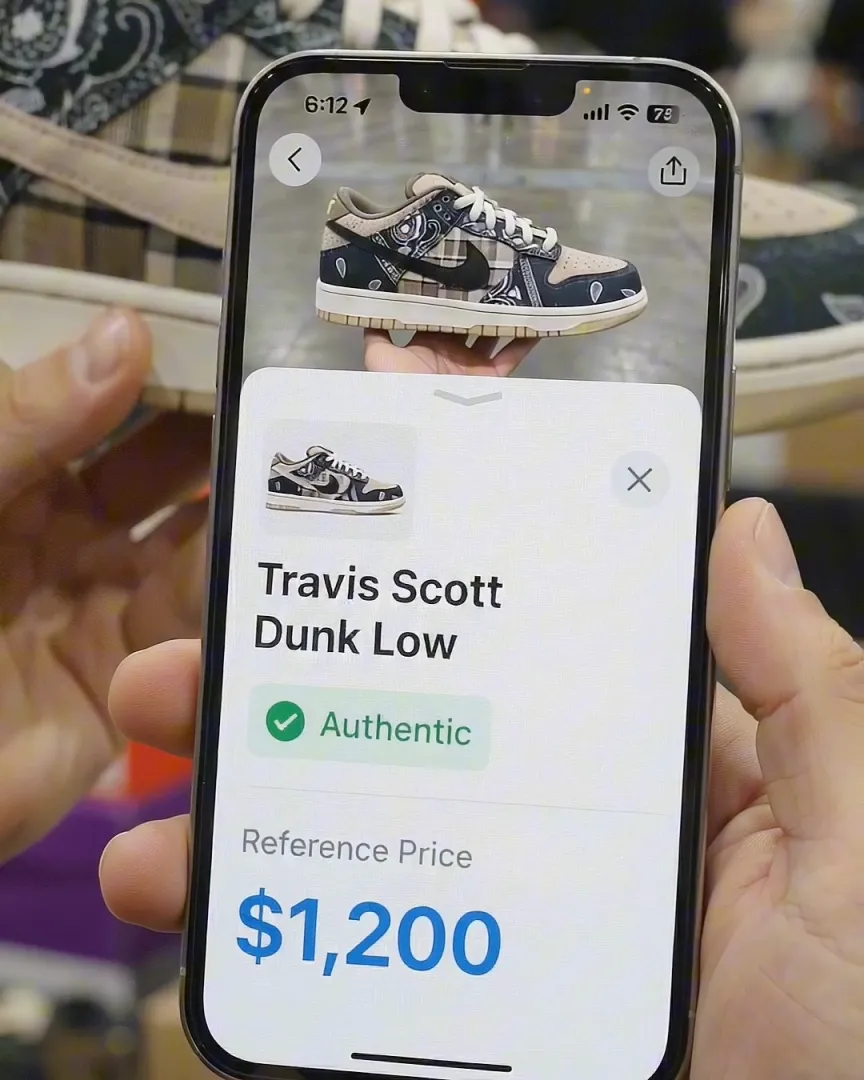
To find out what shoe or sneaker this is, take a photo of it or upload a screenshot to Sneaker AI. In a few seconds you get the brand, model, colorway and style code, plus a reference resale price.
It works on shoes you are holding, shoes on a shelf, and shoes you saw in a post. Then, if you are about to buy, run a legit check on the same pair.
 Free download · iPhone
- Instant AI scan
- 2-expert legit check
- Shareable certificate
3 steps
How to find out what shoe this is
From a mystery pair to the exact release in under a minute.
- 01
Snap or upload a photo
Photograph the outer side of the shoe with the whole sole in frame, or upload a screenshot. Crop out other shoes so the AI knows which pair you mean. - 02
Get the model in seconds
Sneaker AI matches the silhouette, panels, logos and colors against 500+ brands and returns the model, colorway nickname and style code. - 03
Confirm, price, legit check
Match the style code on the size tag, see what the pair sells for, and send it for a legit check if you are buying.
The result
What you get back when you scan a shoe
Asking “what shoe is this?” usually means you want more than a name. Sneaker AI’s shoe identifier gives you everything you need to find the exact pair online:
| Field | Example | Why it matters |
|---|---|---|
| Brand and model | Nike Dunk Low | Narrows the search from thousands of shoes to one line |
| Colorway nickname | “Panda” | The name sellers and resale sites list it under |
| Style code (SKU) | DD1391-100 | Identifies the exact release; search it to find listings |
| Reference price | Recent resale value | Tells you if an asking price is fair or too good to be true |
| Authenticity check | AI scan or 2-expert review | Confirms the pair in front of you is real |
The style code is the most useful field. Two pairs can share a nickname but come from different years with different shapes and materials, and the code is how you tell them apart. Our Nike shoe tag guide shows where to find it on the shoe itself.
Photo tips
How to take a photo that gets identified
Most failed identifications come from the photo, not the shoe. A few seconds of setup makes a big difference:
- Shoot the outer side profile. It shows the silhouette, the logo placement and the sole, which are the features that separate one model from another.
- Fill the frame with one shoe. Crop out other pairs, people and busy backgrounds.
- Use even daylight. Avoid strong color filters and harsh shadows; they change how the colorway reads.
- Add a second angle if it is close. The heel, the tongue label or the sole often settles look-alike models.
- From a video, pause on the sharpest frame and screenshot it, rather than grabbing a frame in motion.
Want the full walkthrough, including how to use reverse image search? Read how to identify sneakers from a picture.
Your options
Other ways to answer “what shoe is this?”
An app is the fastest route, but it is not the only one. Here is how the common methods compare:
| Method | Best for | Watch out for |
|---|---|---|
| Sneaker AI | Exact model, colorway and style code, plus price and a legit check in one place | iPhone only |
| Google Lens / reverse image search | Finding where the photo or a similar product appears online | Often returns look-alikes or the wrong colorway; no authenticity check |
| Size tag or box label | Confirming the exact release when you have the shoe | Fakes copy tags too, so a code proves the model, not that it is real |
| Reddit and sneaker forums | Rare, vintage or obscure pairs | Can take hours or days; answers vary in quality |
Look-alikes
Shoes people mix up most
Some models look nearly identical in a photo. If the result surprises you, check these details:
- Nike Dunk Low vs. Air Jordan 1 Low: check the heel. “NIKE” embroidery means Dunk; a Jumpman or Wings logo means Jordan 1 Low. See Dunk Low vs. Jordan 1 Low.
- Jordan 1 High vs. Mid: the Mid has eight lace holes per side instead of nine, and a Jumpman tongue tag instead of “Nike Air.” See Jordan 1 High vs. Mid vs. Low.
- Air Force 1 vs. Dunk Low: the AF1 has a chunkier cupsole with “AIR” on the midsole and a small lace dubrae.
- Yeezy 350 V2 colorways: many share the same Primeknit pattern; the side stripe text and the sole color separate them. See the Adidas identifier.
Questions
Frequently asked questions
What sneaker is this? How do I find out?
Take a clear side-profile photo of the sneaker, or upload a screenshot, and scan it with Sneaker AI. It names the brand, model and colorway and gives you the style code. Then match that code to the size tag or box label to confirm the exact release.
How do I find out what shoe this is from a picture?
Open Sneaker AI, take a photo of the shoe or upload a screenshot, and the app returns the brand, model, colorway nickname and style code in seconds. For the best match, use a side-profile photo of the outer side of the shoe in good light, with the whole sole visible.
Can I identify a shoe from a screenshot of Instagram or TikTok?
Yes. Upload the screenshot and crop it so the shoe fills most of the frame. If the shoe is small or blurry, pause the video on the clearest frame, or upload two or three screenshots from different angles.
How accurate are shoe identifier apps?
Accuracy depends mostly on the photo. A clear side profile of a popular model is usually identified correctly; a blurry, cropped or heavily filtered photo is harder. Colorways that look almost identical can be confused, so confirm the result with the style code on the size tag or box label when you have the shoe in hand.
What if the shoe in the photo is fake?
A shoe identifier tells you which model the shoe is meant to be, not whether it is real. To check authenticity, run a legit check: Sneaker AI's AI scan flags common replica tells, and the Expert Legit Check has two human authenticators review your photos and issue a certificate if the pair passes.
Where is the style code on a sneaker?
On Nike and Jordan shoes it is printed on the size tag inside the shoe, as six characters, a dash and three digits (for example DD1391-100). Adidas prints a six-character article number (for example B75806) on the tag inside the tongue. The same code is printed on the box label. Searching that code is the most reliable way to confirm the exact release.
Does it work for brands other than Nike and Jordan?
Yes. Sneaker AI recognizes 500+ brands, including Adidas, Yeezy, New Balance, Asics, Converse, Vans and luxury labels. Popular models and colorways are recognized most reliably.
Keep going
Related tools and guides
Shoe identifier
Identify any shoe by photo: brand, model, colorway and SKU in seconds.
OpenAuthenticateSneaker authenticator
AI legit check plus two human experts and a shareable certificate.
OpenBrand guideNike shoe identifier & authenticator
Identify any Nike by photo or style code, then legit check it.
OpenFree download · iOS
Stop guessing. Scan the shoe.
Download Sneaker AI and find out what shoe it is, what it is worth, and whether it is real.